📋 Profile Configuration
A Profile is the core configuration unit of the entire DK-Suite. Each Profile is a complete 8×2 shortcut key layout. When switching Profiles, the grid layout, shortcut key configuration, and Knob routing mode all switch together.
📑 Preset Profiles Overview
Click a name for detailed illustrated guides:
🎮
Discord
Discord voice chat shortcut keys
💼
Meeting Assistant
Meeting recording/translation/annotation
🌈
Colorful Screen
Full-screen dynamic color/animation effects
⚡
Quick Operations
System-level shortcut key layout
📊
System Monitor
Real-time CPU/Memory/GPU/Network monitoring
🤖
AI Assistant
One-click AI chat and content generation
🎵
Music
Audio playback controls
🕐
Clock
Full-screen clock display
🦀
DKClaw ⭐
OpenClaw Agent Dashboard (Core)
Switching
Entry: the Knob Config toggle at the top-right of the main window.
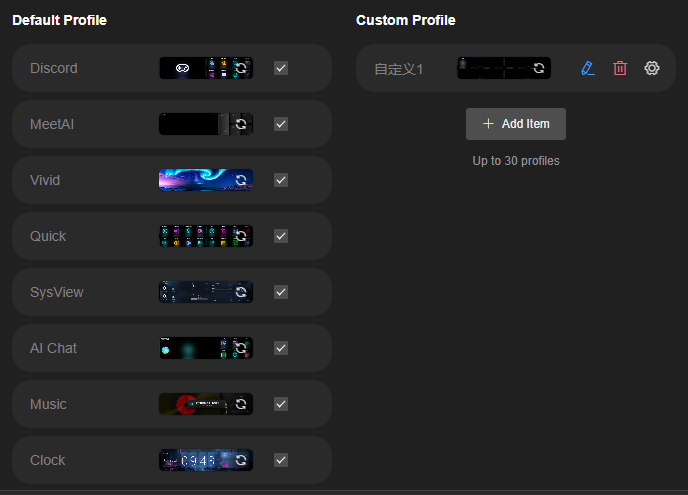
The panel has two columns:
| Area | What you can do |
|---|---|
| Default profiles | 9 bundled profiles; tick a row to enable it, refresh icon updates its thumbnail |
| Custom profiles | “+ Add item” to create one; row icons are refresh thumbnail / edit / delete / settings |
The panel states the limit: up to 30 profiles enabled at once.
Custom Profile
Create your own Profile by dragging functions from the left component panel into the 8×2 grid.
🔧 Custom Profile & Shortcuts →
Edit / Delete
- Scroll to the bottom of the dropdown and select "Edit Profile" → Rename or delete custom profiles
- Built-in presets (1-9) cannot be deleted
Notes
- Colorful Screen and Clock presets: keys are not editable
- Music: When the file input is empty, the interface buttons serve as music player shortcuts by default
- DKClaw: Voice routing is fixed to Lobster mode